Calendar aligned renewals
By default, a subscription renews on the anniversary of its start date: a monthly subscription that starts on January 15 renews on the 15th of every month. With Calendar aligned renewal, the subscription instead renews on fixed calendar dates, such as the 1st of every month. The first, shorter period up to that date is invoiced prorated.
Forward-charged subscriptions only
Calendar aligned renewal is only available for subscriptions on forward-charging plan terms.
How it works
A calendar aligned subscription renews on these dates:
| Billing frequency | Renews on |
|---|---|
| Monthly | The 1st of every month |
| Every 2, 3, 4 or 6 months | The 1st of each period, counted from January (quarterly: Jan 1, Apr 1, Jul 1, Oct 1) |
| Yearly or every 12 months | January 1 |
| Weekly | Mondays |
| Daily | Every day (no change) |
When you create the subscription, Fenerum automatically:
- Starts it right away and issues an invoice for the days up to the first renewal date, prorated by the number of days, like other partial-period charges in Fenerum.
- Renews it in full on every renewal date after that.
If the subscription starts exactly on a renewal date, for example on the 1st of the month, the first invoice is a normal full period.
Creating a calendar aligned subscription
You need the Full access to billing permission.
Go to the account and click +Add subscription.
Fill in the plan, price, quantity and the other usual fields.
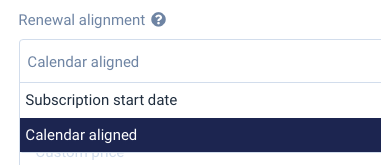
Open Advanced settings and set Renewal alignment to Calendar aligned.
Check First period and First period price in the Subscription Summary. They show the prorated period up to the first renewal date.
Click Save. The prorated invoice is issued right away.
Making it the default
If most of your subscriptions should renew on calendar dates, you can make Calendar aligned the default on the subscription form.
- Go to Settings and open the Invoice tab.
- Set Default billing alignment to Calendar aligned.
- Click Save.

The setting only changes the default value on the form. You can still choose Subscription start date on each new subscription, and existing subscriptions are not changed.
Example
A customer subscribes to a monthly plan at DKK 310 on January 11, with Calendar aligned renewal.
- January 11: an invoice for January 11–31 (21 of 31 days), prorated to DKK 210.00.
- February 1 and onwards: an invoice for DKK 310.00 for the full month, on the 1st of every month.
