Invoice fees
Invoice fees let you charge your customers for the cost of collecting a payment, like a card fee or an invoice handling fee. Fenerum adds the fee to every invoice, based on the invoice's collection method.
Optional feature
Invoice fees is an optional feature and is not active by default. Please contact us at support@fenerum.com if you would like to use this feature.
Set up invoice fees
Fees are booked and taxed through a revenue group, so they go to the right account with the right VAT. We recommend a separate revenue group for fees, so they are booked apart from your other revenue.
- Create a revenue group: Go to Revenue groups, click New revenue group, give it a name like "Invoice fees" and choose the revenue accounts the fees should be booked to.
- Choose it for invoice fees: Go to Settings → Accounting and choose the group as the Invoice fee revenue group in the Invoice Fees section.
- Add your fees: Go to Settings → Invoice, find Invoice Fees, click Configure and then Add fee:
- Collection method: Payment Card, Invoice or Direct debit.
- Description: the text shown on the invoice, e.g. "Card fee".
- Percentage: a percentage of the invoice total excluding VAT.
- Fixed amount: an amount in your accounting currency.
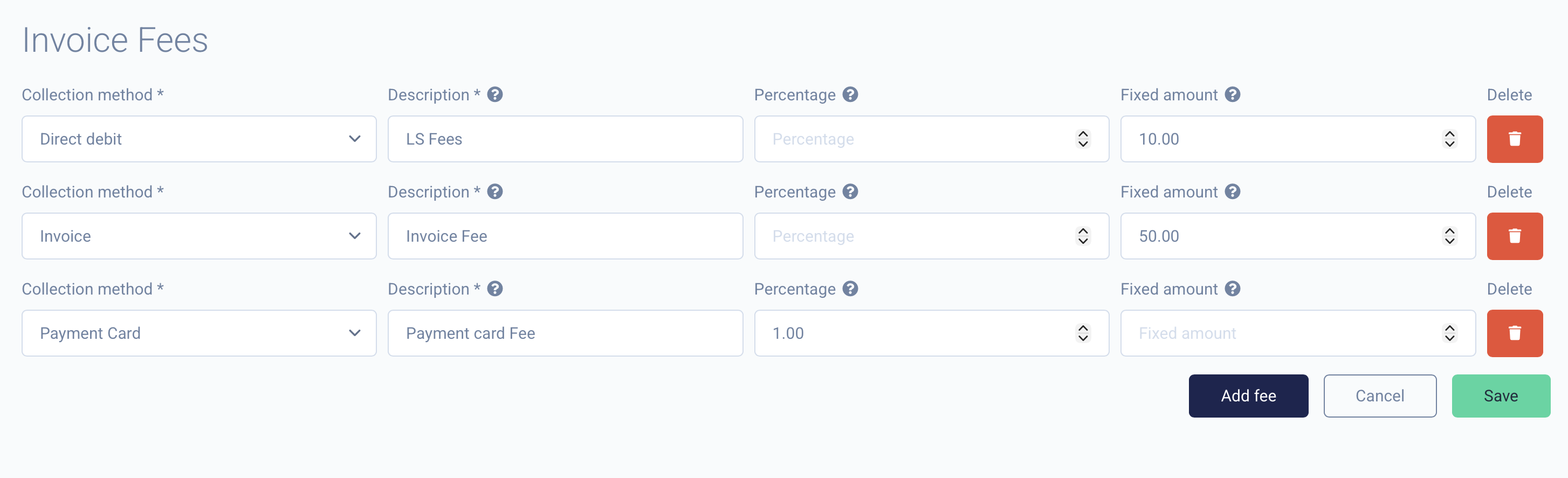
Each fee needs a percentage, a fixed amount, or both, and you can add one fee per collection method. No fees are added to invoices until a revenue group is chosen.
Once saved, your fees are listed in the Invoice Fees section of Invoice Settings:

How fees appear on the invoice
The fee is added at the bottom of the invoice, with VAT like any other line.
- A percentage fee is calculated on the invoice total excluding VAT, and the percentage is added to the description, e.g. "Card fee (2.5%)".
- A fixed amount is converted to the invoice currency using the exchange rate on the invoice date.
- If a fee has both, the invoice gets two fee lines.
Because the fee is added to every invoice, a percentage fee grows with the invoice, and it is charged again on every renewal.
Example
With a 2.5% fee for Payment Card and a 100.00 DKK fee for Invoice, a 400.00 DKK subscription is invoiced like this:
| Paid by | Description | Price |
|---|---|---|
| Payment Card | Basic | 400.00 |
| Card fee (2.5%) | 10.00 | |
| Invoice | Basic | 400.00 |
| Invoice fee | 100.00 |
Invoice previews include the fee, so you can check the total before the invoice is created.
When no fee is added
Fees are only added to regular invoices, not to:
- Credit notes
- Reminder fee invoices
- Invoices with a total of zero or less
- Invoices charged to a reseller
- Invoices whose collection method has no fee
- Accounts that are exempt from invoice fees
Exempting an account
To stop charging fees to a specific account, edit the account and clear Is charged invoice fees under the advanced options. New accounts are charged invoice fees by default.

In the API, this is the is_charged_invoice_fees field on the Account.
Crediting an invoice
When you credit an invoice, its fee lines are credited too and booked to the same accounts as the original fee.
Check your local rules
Rules on charging fees for card payments and invoices vary between countries. Check your local rules and customer agreements before you add invoice fees.