Discounts on subscriptions
You can now give a subscription its own discount directly on the subscription, so the everyday "this customer gets 20% off" case no longer needs a contract with tiers and a commitment length. The discount is set in Advanced Settings on the subscription form and applies from the subscription's next invoice onwards.
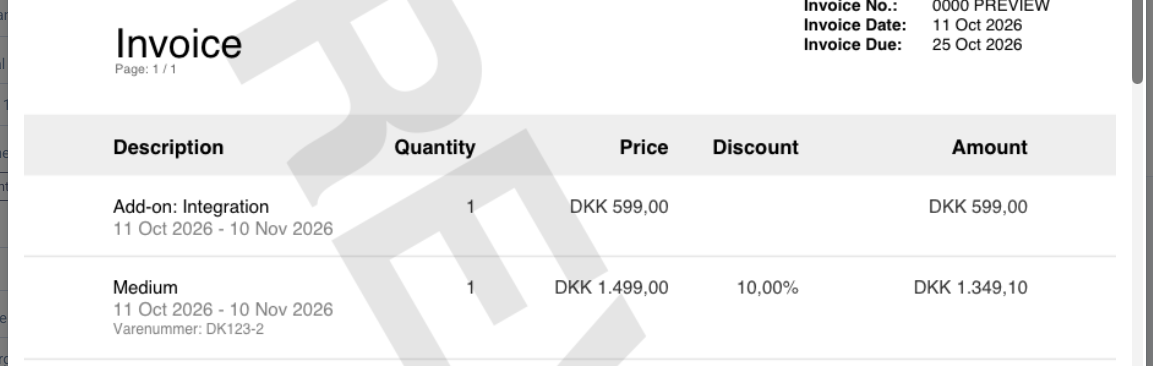
The discount rides on the same invoice line as the plan. It shows up in the discount column on the invoice PDF, and is reflected in MRR, credit notes, and the electronic invoice formats (Peppol/OIOUBL) automatically. It is not added as a separate invoice line.
When to use a subscription discount vs. a contract
- Subscription discount: for a simple, ongoing discount on a single subscription: a flat percentage, an amount off per seat, or a fixed amount off the line. No commitment period, no quantity tiers.
- Contract: when you need a binding commitment length, quantity-based tiers, or a discount that should apply to every subscription an account creates on a plan.
One or the other, not both
A subscription discount and a discount contract for the same account and plan terms are mutually exclusive. If the account already has a discount contract for the plan, you cannot set a discount on the subscription (and vice versa). Fenerum will show an error and ask you to remove the other one first.
Setting a discount on a subscription
You need the Full access to billing permission. The discount can be set when you create a subscription, and changed later through a subscription change.
On the subscription form, open Advanced Settings.
Choose a Discount type from the selector. The matching amount field appears below it.
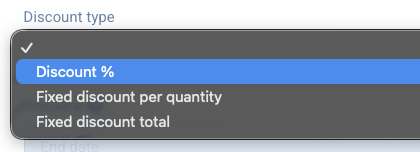
Enter the discount amount in the field that appears below the selector.
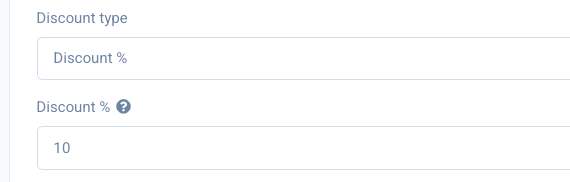
Use the preview panel to confirm the discounted price before you save.
Only one discount type can be set at a time. Leaving the discount type empty means no discount.
Discount types
These are the same three discount types available on invoice lines.
Discount %
Applies a percentage discount to the line. For example, entering 20 takes 20% off the subscription price × quantity.
Fixed discount per quantity
Applies a fixed amount off for each unit of quantity. For example, entering 50 on a subscription with a quantity of 3 gives a discount of 150. The currency follows the plan terms.
Fixed discount total
Applies a single fixed amount off the whole line, regardless of price or quantity.
How it behaves
- Applied at create, change, and renewal. Like other subscription attributes, a discount takes effect from the subscription's next invoice. Change it through a subscription change and it applies from that point.
- Proration. When a period is charged prorated (for example a partial first period), fixed discount amounts are prorated alongside the price.
- Credit notes. If you cancel or credit mid-period, the credit line refunds the discounted amount that was actually charged, not the list price.
- On the invoice. The discount appears in the discount column on the same line as the plan, so the line's subtotal reflects the discount directly.
FAQ
Can I combine two discount types on one subscription?
No. Only one of the three discount types can be set on a subscription at a time.
The subscription discount field is blocked, why?
The account already has a discount contract for the same plan terms. A subscription discount and a discount contract for the same account and plan are mutually exclusive; remove the contract first, or use the contract instead of a subscription discount.
Will the discount show as a separate line on the invoice?
No. Unlike a contract discount (which appears on a separate line), a subscription discount is shown in the discount column on the same invoice line as the plan.